TDEE calculator
Find your maintenance calories with the TDEE calculator, then compare activity levels and daily macros.
Estimated maintenance
Daily calorie estimate
—kcal/day
Adults only; not medical advice. Excludes pregnancy, breastfeeding and clinical care.
Estimated resting energy
BMI compares weight with height; muscle and body fat can change how you interpret it.
Resting energy and activity
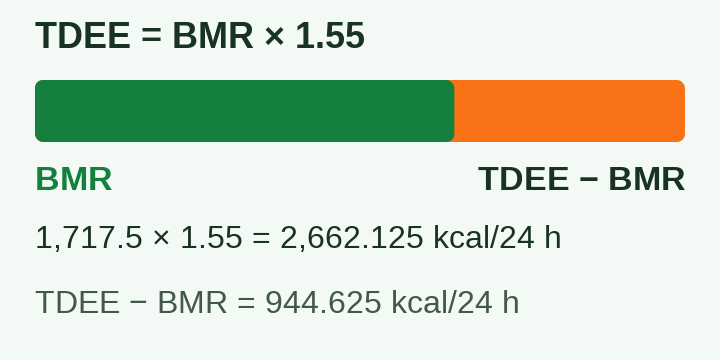
Green shows resting energy. Orange adds everyday movement, exercise and digestion using your activity factor.
Compare calorie deficit and surplus
Choose a lower, maintenance or higher calorie example. The macro grams below use this same amount.
Enter −2000 to +2000 kcal/day. Negative means a deficit; positive means a surplus.
Daily macro grams
The order is protein / fat / carbohydrate. Protein and carbohydrate provide 4 kcal/g; fat provides 9 kcal/g.
| Macro | Percent of energy | kcal/day | g/day |
|---|
Compare the resting-energy equations
| Equation | Resting kcal/day | Daily kcal/day |
|---|
What the activity assumption changes
| Multiplier | Daily kcal/day | Difference from selected factor |
|---|
Different assumptions, not a confidence interval
Calculation notes
Calculations keep full precision. Display values are rounded; gram totals may not reconstruct the rounded headline exactly.
Print opens your browser’s print dialog. The report includes every assumption.
How does the TDEE calculator estimate daily calories?
A desk job with three workouts and a physical job with the same three workouts can mean very different daily energy needs. I start with your usual working day, then compare neighbouring activity levels in the TDEE calculator before changing the formula. Describe your whole routine, including walking and seated time, rather than choosing a factor from gym visits alone.
The TDEE calculator keeps those assumptions visible. Enter adult measurements, choose a published equation and inspect the activity comparison. The green segment represents estimated resting energy; the orange segment is everything the multiplier adds. That orange portion is not a reading from a watch and is not a separate exercise allowance to add again. Digestion and everyday movement sit within the overall assumption.
The calculator is general information for adults aged 18 and over. It is not a diagnosis, nutrition prescription or medical advice. Pregnancy, breastfeeding, childhood, illness, recovery and clinical nutrition require a different assessment. The NIDDK Body Weight Planner also explains its adult scope; a static equation cannot substitute for individual care.
What measurements do I need to calculate TDEE?
Use your current weight and height, in one coherent system. The imperial form accepts feet and inches separately, including zero inches: six feet zero inches is 72 × 2.54 = 182.88 cm. Pounds convert with 0.45359237 kg per pound. Changing the display system preserves the underlying metric values rather than repeatedly converting rounded text. Edit a displayed measurement only when you intend to change it.
Age is entered in whole years. The sex selector chooses one of the two coefficient sets in the published height-and-weight equations; it does not capture individual physiology or hormone treatment. Body fat is optional for Mifflin–St Jeor and revised Harris–Benedict, and required for the lean-mass equation. If you do not have a defensible body-fat estimate, leaving that field empty is more transparent than inventing one.
A decimal comma or decimal point works, but thousands separators and unit suffixes do not. Enter 75.5 or 75,5, not 75kg. Broad interface limits keep malformed values out; they are not a claim that a prediction equation is validated for every allowed combination. Valid input changes update the result automatically after a short pause; Calculate updates it immediately. A faded old headline and disabled export buttons prevent stale estimates from being copied as new results.
How is TDEE calculated? A worked example
Take an illustrative adult using the male coefficient, aged 30, weighing 75 kg and measuring 178 cm. Mifflin–St Jeor gives 10 × 75 + 6.25 × 178 − 5 × 30 + 5 = 750 + 1,112.5 − 150 + 5 = 1,717.5 kcal/day. Selecting an activity factor of 1.55 gives 1,717.5 × 1.55 = 2,662.125 kcal/day. The headline rounds to 2,662; subsequent calculations retain the unrounded value.
The original Mifflin paper describes a resting-energy prediction equation. The interface also uses revised Harris–Benedict coefficients presented by Maastricht UMC nutritional assessment. Here weight is always kilograms and height centimetres. Similar names do not make the original and revised Harris equations interchangeable; the coefficient sets must travel with their units. The calculator uses the common simplified Mifflin coefficients: 10 for weight, 6.25 for height and 5 for age. The original regression coefficients are slightly different.
| Control inputs | Resting estimate | Daily estimate at 1.55 |
|---|---|---|
| 75 kg, 178 cm, age 30, male; Mifflin | 1,717.5 kcal/day | 2,662.125 kcal/day |
| Same measurements, female; Mifflin | 1,551.5 kcal/day | 2,404.825 kcal/day |
| Same measurements, male; revised Harris | 1,777.049 kcal/day | 2,754.42595 kcal/day |
| 75 kg, body fat 20%; lean mass | 1,666 kcal/day | 2,582.3 kcal/day |
For the last row, estimated fat-free mass is 75 × (1 − 20/100) = 60 kg. The lean-mass expression is 370 + 21.6 × 60 = 1,666 kcal/day. A guessed body-fat percentage changes the input to that equation; it does not automatically improve the estimate. Compare the formulas to understand their assumptions, not to select whichever number supports a preferred eating target.
Which activity multiplier should I choose?
| Illustrative multiplier | Daily kcal at resting 1,717.5 | Difference from 1.55 |
|---|---|---|
| 1.20 · Sedentary | 2,061 | −601.125 |
| 1.375 · Lightly active | 2,361.5625 | −300.5625 |
| 1.55 · Moderately active | 2,662.125 | 0 |
| 1.725 · Very active | 2,962.6875 | +300.5625 |
| 1.90 · Extra active | 3,263.25 | +601.125 |
I use that table to test the assumption before discussing small differences between formulas. An office day with a workout can still contain many seated hours; a physically demanding job can involve substantial movement without a formal training session. The presets describe illustrative overall activity. They are not a schedule assigning a multiplier to a fixed number of gym visits, and the highlighted bar means selected, not recommended.
A custom factor from 1.20 to 2.50 allows an assumption you want to examine. The spread between rows is not a confidence interval, an error bar or a guarantee that your true expenditure lies inside it. Read the activity-factor guide before adding exercise calories to an estimate that already includes activity. Double counting can produce a larger error than display rounding.
How do calorie deficits and surpluses change macro grams?
The default scenario has no energy difference: it uses estimated maintenance. Lower and higher examples subtract or add a stated number of kcal per day. They are arithmetic comparisons, not recommended intakes and not promises of kilograms lost or gained each week. A static daily difference cannot describe changing body mass, adaptation, adherence or individual health needs.
For the worked example, a −550 difference gives 2,662.125 − 550 = 2,112.125 kcal/day. A 30% protein share gives 2,112.125 × 0.30 ÷ 4 = 158.409375 g/day. A 35% fat share gives 2,112.125 × 0.35 ÷ 9 = 82.13819444 g/day; a 35% carbohydrate share gives 184.8109375 g/day. Every displayed macro, the copied report and printing use this same selected scenario.
The 4/9/4 energy conversion is an arithmetic convention for protein, fat and carbohydrate. It is not a food-quality assessment or a personal macro recommendation. Custom percentages must sum to 100. If the energy difference produces zero or negative energy, macros and exports are unavailable. A scenario below estimated resting expenditure carries an explicit caution; the calculator does not invent a universal safe intake floor.
What does my BMI mean, and how are settings saved?
BMI divides weight in kilograms by squared height in metres. At 75 kg and 1.78 m, 75 ÷ 1.78² = 23.67125363. The CDC adult BMI categories are screening categories for ages 20 and over, not diagnoses. For ages 18–19 this tool shows the numeric result without assigning those adult categories. BMI does not measure body fat or tell a muscular adult what to eat.
Calculations run in the browser. Nothing is saved automatically. Save settings stores measurements and choices on this device; Clear removes this calculator’s settings key. On a shared device, consider whether saving personal measurements is appropriate. Clipboard restrictions leave a selectable report for manual copying. The formula guide and macro arithmetic guide explain the remaining assumptions so the exported number keeps its context.
Explore the energy assumptions
 Choosing a TDEE activity factor without double countingA training count is not a whole-day multiplier. Compare the assumptions before adding exercise calories.Reading time: 5 min
 BMR formulas compared: what each estimate assumesRead the coefficients and units before selecting an equation. A body-fat guess is another assumption.Reading time: 5 min
 From daily energy to macro grams: follow the arithmeticOne energy scenario, three energy shares, three gram conversions. See exactly what the macro ring represents.Reading time: 5 min
Questions about daily energy estimates
Is this my exact calorie requirement?
No. It is an equation estimate multiplied by an activity assumption, not measured metabolism or a personal nutrition prescription.
Which equation should I select?
Compare their inputs and assumptions. A lean-mass equation requires a defensible body-fat estimate; no equation is ranked as universally most accurate here.
Are the lower-energy scenarios weight-loss plans?
No. They show arithmetic differences only and predict no weekly weight change. Discuss personal needs with a qualified clinician.
Why do my displayed macro grams not reproduce the headline exactly?
Calculations keep full precision, while displayed energy and grams are rounded separately.
Does changing units change the result?
A unit switch alone preserves canonical metric measurements. Editing a converted display value changes the input.
Are my measurements saved?
Only when you press Save settings. Calculations and settings stay in your browser; Clear removes this calculator’s saved settings.
Updated · About this site